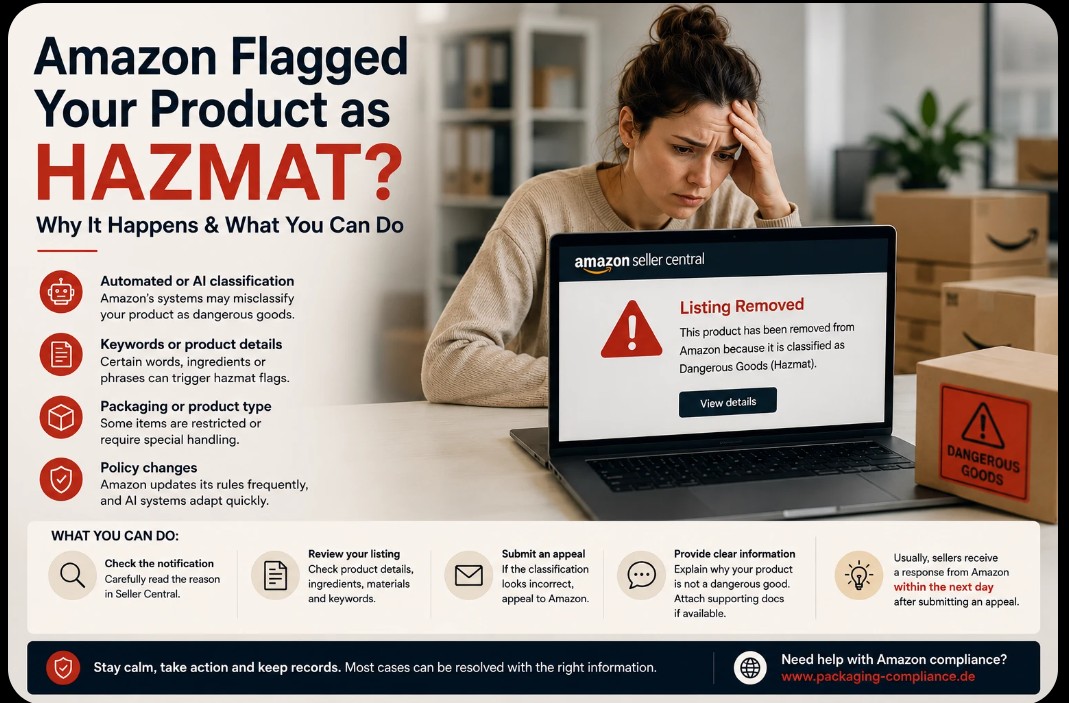
Artificial intelligence is rapidly changing e-commerce. Many systems have become faster and more automated — but not everything has become easier. In some areas, sellers are now experiencing the downside of automated moderation, especially on large marketplaces like Amazon.
Recently, many Amazon sellers have reported alarming notifications: products classified as dangerous goods (hazmat), FBA shipments blocked, or listings removed over compliance concerns. For sellers with only one main product, a single automated decision can stop sales overnight.
Status of this article: All details were verified in August 2026 against Seller Central documentation and current industry sources.
Why is this happening?
Amazon uses automated systems and AI-assisted reviews to identify potentially dangerous products. These systems analyse product titles, keywords, ingredients, materials, packaging, images and category information.
Often this works correctly. But sellers increasingly report cases where entirely ordinary products are flagged as dangerous goods without a clear explanation.
An important qualification: the classification is not arbitrary. It follows air transport regulations, warehouse safety standards and international shipping law. Amazon sorts dangerous goods into the nine UN hazard classes; according to Seller Central, more than 3,000 product types count as dangerous goods. The frustration usually comes not from the rule itself but from how little context Amazon provides when something is flagged.
What typically triggers a review
Certain product groups trigger a review far more often than others:
| Trigger | Typical products |
|---|---|
| Lithium batteries (Class 9) | Electronics, power banks, anything battery-powered — the single most common trigger |
| Flammable liquids | Alcohol-based products, perfume, nail polish remover, paints |
| Pressurised gases | Aerosols, spray cans |
| Chemicals | Cleaning agents, disinfectants, hand sanitiser |
| Corrosives | Certain cleaners and care products |
For lithium batteries, Amazon's 2026 requirements are particularly explicit: clear watt-hour ratings, lithium content disclosure and alignment with UN 38.3 transport testing.
The problem with automated classification
AI systems are designed to detect risk quickly. But automated moderation also produces false positives: certain words in a listing trigger a review, packaging or product descriptions are misread, or products are grouped into restricted categories in error.
The consequences are tangible: shipment delays, listing removals, blocked FBA inventory — and serious financial pressure.
How the review process actually works
There is a structured process behind that notification. Knowing it lets you respond precisely:
1. Flagging. The system analyses your product information and flags potentially hazardous items.
2. Document review. Amazon requires either a compliant Safety Data Sheet (SDS) or a completed exemption sheet — the requirements are set out in the Dangerous Goods Identification Guide — and for batteries, the UN 38.3 test report as well.
3. Outcome. Three possibilities: approved as dangerous goods, cleared as non-dangerous, or rejected.
The most common failure point: delays often arise not because a document is missing, but because the document submitted does not match Amazon's formatting and hazard disclosure standards. An incomplete or outdated Safety Data Sheet is the leading cause of rejection.
What sellers should do
If your product is suddenly flagged as hazmat:
Stay calm. Most cases can be resolved with the right information.
Read the notification carefully. Seller Central states what the classification is based on — under Account Health.
Review the listing. Go through product details, ingredients, materials and keywords. Make sure your listing does not contain wording that contradicts your appeal — copy advertising something as "highly flammable" undermines a claim that the product is not hazardous.
File an appeal. In the Manage Dangerous Goods Classification tool there is a Dispute classification function. That is where you upload a new Safety Data Sheet or exemption sheet.
Attach evidence. Safety Data Sheet, manufacturer's declaration, and for batteries the UN 38.3 report. Clear, factual, complete.
Keep records. Save all case numbers and responses — if the case escalates, the history matters.
How long does the review take?
Unrealistic expectations circulate here. A dangerous goods review takes three to five business days on average — not a few hours. Planning around that keeps your inventory and restocking realistic.
If the case is transferred to another team, it can take longer. That is why it pays to submit complete documentation with the first appeal rather than filing additions later.
Important for international sellers
One point that regularly costs cross-border sellers money: dangerous goods approvals are marketplace-specific. An approval on amazon.com does not automatically carry over to amazon.de. Each marketplace requires its own approval.
On top of that, products classified as dangerous goods face reduced FBA storage limits and higher fees, and ship only from specific fulfilment centres. That has a direct effect on your inventory planning.
Since 30 April 2026, Amazon has extended its Partnered Carrier programme to all FBA-eligible dangerous goods — so you can use discounted partner carriers for these shipments too, instead of arranging your own transport.
AI helps — but it is not perfect
Artificial intelligence helps marketplaces process enormous volumes of data. Cases like these are a reminder that automated systems remain fallible.
The more common AI moderation becomes across marketplaces, the more often sellers will find themselves in situations where human review and appeals are necessary. Sellers who keep their product documentation in order have a clear advantage when that happens.
Official sources
- Amazon: Dangerous Goods Identification Guide
- Amazon: Dangerous Goods Policy
- Amazon Seller Central: Account Health
- UNECE: Transport of Dangerous Goods (UN 38.3)